
The instructions and config profile can be downloaded from this file link or the QR:
iPhone:
Before configuring the APN profile, connect iPhone to WiFi in device settings.
APN: To configure an iPhone to work with a Cellhire France SIM, follow the below instructions.
Important: When finished with the Cellhire France SIM card, you must remove the configuration profile in order for data to work with your original SIM card/network provider.
Install Profile:
1. Connect iPhone to WiFi.
2. Scan the QR or click on the link below:
Orange France mib APN Profile Download

3. Follow the below download process instructions
Instructions:
1. After following the link, you will arrive at the download page. Click download.
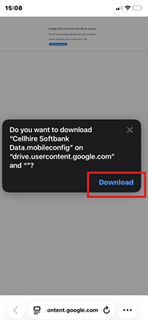
2. The profile will then be downloaded into your settings page. From the main menu in ‘Settings’ app, select ‘Profile Downloaded’. From there, you will be prompted to install the profile. Click ‘install’
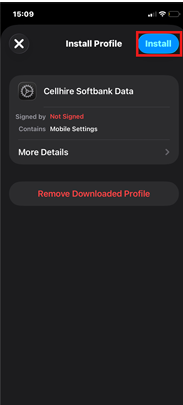
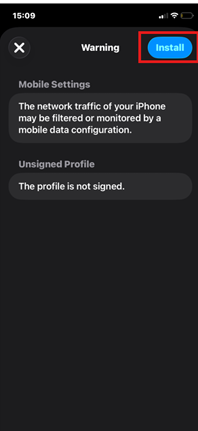
3. You will be prompted to input your passcode and then click install again.
Instructions to Remove Profile where needed:
1. Open iPhone Settings menu and go to General.
2. Scroll down to Profile and click on the profile.
3. Tap Remove Profile and follow the on-screen instructions (note – you may need to enter iPhone pin code to proceed).